Showing posts with label AutoPainter. Show all posts

Monday, November 11, 2013

Beach Pines~ You can never duplicate the exact image unless you write it all down!


This is an image I posted on Facebook over the weekend. One Facebook friend said they hoped I would write a tutorial on my blog for this processing. Well...... I can tell you what I shot it with and maybe a few steps along the way. However to duplicate the exact same image after the fact, with a process one could share, without writing down the original process, is almost impossible. I am not one to write down my processes with exacting steps. In this tutorial I have tried to recreate the image to some degree here. Hopefully these steps will be a starting point for a creative process you might want to try.

Original Image Capture: Hipstamatic Oggl ~ Lowry Lens Kodot XGrizzled Film
The reason I chose Oggl is because you can control exposure. Using the reticles in Oggl I wanted to open up the deep shady areas of the pines. I didn't care if the sky blew out because it was gray and overcast anyway. I did want a hint of horizon line from the ocean. SO controlling capture is important to me as well as processing. I knew I wanted to add textures to the sky area when I shot this image.
Original Capture
Processing:
A. Open the Hipstamatic image in Mextures then choose
 1. Grunge Filter Painterly
                                           Choose Blend Mode Multiply
Screen shot of Mextures Grunge interface
Then Adjust texture to 50% Check and continue to add filters in Mextures.
Screen shot of Mextures Vintage User interface
   2. Then add new filter in Mextures
       Landscape enhance "Vignette" at 20 %  Blend mode overlay (not shown) Check and continue  to  add filter in Mextures.
   3. Then add new filter in Mextures
          Vintage "Polaroid" at 20% Blend mode Hard Light 
Save file to Photo Library

B. Open the saved Mextures file in AutoPainter and apply Benson filter and save.
AutoPainter file

C. Open the last saved Mextures file (not the AutoPainter file) in Leonardo and apply the Clarity slider as shown in screenshot and save to Photo Library.
Screen shot Leonard Clarity interface
D. Open AutoPainter saved image in Snapseed and add ambience and warmth in the Tune Image Command and save file.
Screen shot Snapseed
E. Open Image Blender and open The last saved Mextures file from Leonardo first, with the last saved AutoPainter file from Snapseed and blend with Lighten mode at about 45% and save.
Screen shot ImageBlender interface
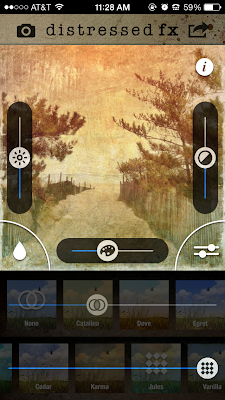
F. Open the saved ImageBlender file in distressed fx and use filters to adjust color save.
Screen shot distressed fx interface
G. Lastly to the saved distressed fx file add a vignette in Mextures and save. This is close but not exact in tone and shading however, I hope the tutorial will give you some ideas for future processing of your images.
Check out my next all day iPhone Sessions in DC on November 24 sponsored by Capital Photography Center (click here for more info) and in Chestertown, Md on November 23 sponsored by The Chestertown River Arts (click here for more info on Chestertown.)
Final image


Monday, June 11, 2012

A few more recent shots....Chesapeake City

This shot was made while walking the streets of Chesapeake City, Md. during my recent iPhone photography workshop. I was working with the app Classic Pan making a shot of some chairs that were stretched out across the sidewalk, when I noticed this waitress looking out the tall window, I quickly recomposed and made this shot, I made one more shot after this one, but she moved and no longer had that daydreaming look.. "the decisive moment." The image was processed in Snapseed.
A shop keeper had a display of a wooden screen so I made a quick grab and processed it with Photo Wizard, Textures and PicGrunger.


This image is of a sailboat model that I shot through a shopkeepers window. I used AutoPainter VanGough, for the sky and then Blended it back with the original in Image Blender, masked out the VanGough effect on the sail and finished the image off in PicGrunger.

My next all day workshop in Chesapeake City, Md with Horizon Photography Workshops will be December 8. Here's a link for registration: Click Here.
Hope to see you there!


Sunday, May 8, 2011

iPhone goes to New Mexico: Mostly HDR apps...Autopainter and blends


Since arriving Wednesday night I have been enjoying my time here in New Mexico. Every day the weather has been brilliant with clear blue skies! So I have been doing some early morning town walks and making some intimate little images before heading out on the road. The shadows here are amazing and always find a way into an image. I have processed a few from my first couple of days...and will have many more when I get some time, which may not be until I get home a week from now. So I am just sharing a few and then hitting the road today. As this is my last night in the same hotel I am uncertain as to the internet access I will have over the next week or time to post any more. Wishing all the Moms out there a very Happy Mother's day.


Sunday, May 1, 2011

Spring is Here: Hipstamatic


Yesterday I led a workshop at Cylburn Arboretum. The Oriental Peonies are in bloom. They are one of my favorite flowers. I have, in my garden, one Oriental Peony called High Noon. It is a beautiful yellow color but I only have one blossom this year...as I have had the past several years. I should consult with the gardener at Cylburn because theirs are prolific! This has been the prettiest spring I have seen for a while in Maryland. The images here were all shot using the Hipstamatic app. Helga Viking Kodot XGrizzled. It is a nice combo for flower work.The chives were also blooming at Cylburn and the pink dogwoods in my yard are wonderful this year! It's not too late to sign up for my Creative iPhone photography workshop at Penn Camera in Tysons Corner tomorrow night, I hope to see you there.

Friday, April 29, 2011

iPhone Captures the Royals: on TV: Hipstamatic:AutoPainter and more


Being of direct English decent, my mother was a WWII bride, I could not miss watching the Royal Wedding today! I remember seeing the news clips of Diana's wedding but because I was a FT working person, I did not see it as it broadcast. This one I did not want to miss. I mean, where else in the world...but Merry Old England! After a few minutes watching the preparations I remembered what my dad used to do as a photographer, when a major historical event unfolded on the TV, like the Moon walk: he got his camera out and took pictures off the TV screen. Well they were not the best and of course the TV resolution would show, but he had some images to hold on to. So I got my iPhone, made a couple test shots and decided that I wanted to use the Hipstamatic  app, a square format to eliminate the TV branding, and I like square. I knew the actual pictures would not be great but I also knew that with a few creative apps, I could make some interesting artistic images of the day. So I pulled up my chair to within a foot of the TV and played. Then I played more when it was over and processed these images! When the Hipstamatic filled with shots, I switched to CameraPlus Pro, so I didn't miss a moment. Watching and anticipating the TV's camera shots was just like being there and trying to anticipate the next shot, while concentrating on how to frame it if it came up on the TV so I could make a nice composition.
Call me crazy, it was fun, but I should have been working on finishing up my iPhone presentation for Penn Camera on Monday in Tysons Corner...I hope you can join me for some fun images and insights into iPhone photography. Now I have to get busy on that!


Thursday, April 28, 2011

The Cookout: AutoPainter:ArtistaSketch:Iris


Roadside stands used to proliferate on the "National Highway" old RT. 40. Before the "Beltway", before I-95, and I-70 there was Rt. 40. Originating in Atlantic City, New Jersey, passing through Delaware, and spanning the width of the state of MD, Rt. 40 was the way we got around. It took us to the beach and to the mountains of the Alleghenies. Most of the businesses that sprung up on the highway, were motels and restaurants, to accommodate highway travelers. Rt. 40 on the east side of Baltimore was always a bit more industrial due to the factories, but they still had the travelers needs in mind. Now many of the old motels have fallen away or become somewhat "seedy". I had an occasion to travel old Rt. 40 the other day and when I passed this funky little roadside lunch spot called the Cookout I knew I had to turn around and make a few pictures. It was a spot right out of the time machine! The sign says it all as does the picnic bench and road..These images are blended in Iris, using several styles of AutoPaint, the original file and ArtistaSketch to arrive at the renditions here.

Wednesday, April 20, 2011

AutoPainter App


Theres another app I have just come across called AutoPaint. It has four basic paint methods: Cezanne, Van Gogh, Benson and Aquarell. It makes a nice addition to the existing paint apps. I have used it to blend layers of images together in Iris. These are a few images I have made with the app over the last couple days travels.


How do you see a tree...Rays..BracketMode..Noir..Camera or Iphone position matters

Noir, BracketMode, TrueHDR, Rays, Iris

Yesterday I made a trip to the beach. I'll be here for just a few days this time: meeting contractors for maintenance work on the beach house. I had time to stop and make a few images, as I was not racing a clock yesterday. The farmers fields have been planted and the spring wheat is greening. I often see a single tree, as I come and go from the beach. I have noted its place, standing alone in a field, but the time, the weather and conditions have never really been right to stop and make some images, until yesterday! I pulled off the road and onto a farmers road, with no trespassing signs posted. But I figured they wouldn't mind me taking a picture, if they even saw me over the acres of flat wheat fields.

The first image I take is never the "Final" image, instead a warm up...so here is the scene as I shot it with the iPhone app CameraPlusPro. I have done no work to this image. It is right out of the iPhone. Funny when I say that I chuckle, but the thought process is the same for DSLR shooting too! Not much too look at, but rife with opportunity. This image made me switch apps to BracketMode for two images with different exposures, which I had in mind to blend in TrueHDR when I had a chance. I also did not like this camera or iPhone position as it really did nothing for me, so I said what if...what if I see it from the ground with the beautiful green wheat I loved in the foreground. Then it started to happen, I got my mini Joby tripod out because I could not hand hold a bracketed exposure in this muddy knee position! SO I made some brackets, both horizontal and vertical, and headed on down the road.
Raw Ha? not, instead...Unprocessed iPhone image in CameraPlus Pro
When I arrived at the beach and settled in I began to review and process images I made along the way with the iPhone. The tree was my first shot of the trip so I started with that. After running it through TrueHDR it came to life! A wow for me. I added some Rays from the app rays to add some extra pop. Then a new app Noir was mentioned in my iPhone group and I tried that on the processed image and I loved the monotone effect as well. I also like the color version below. Sign up for my iPhone classes in Washington, DC Tyson's Corner on May 2 with Penn Camera and Learn more!
BracketMode, TrueHDR, Iris-Levels, Rays
AutoPainter app, added to processed image.