Showing posts with label Mextures. Show all posts

Monday, November 11, 2013

Beach Pines~ You can never duplicate the exact image unless you write it all down!


This is an image I posted on Facebook over the weekend. One Facebook friend said they hoped I would write a tutorial on my blog for this processing. Well...... I can tell you what I shot it with and maybe a few steps along the way. However to duplicate the exact same image after the fact, with a process one could share, without writing down the original process, is almost impossible. I am not one to write down my processes with exacting steps. In this tutorial I have tried to recreate the image to some degree here. Hopefully these steps will be a starting point for a creative process you might want to try.

Original Image Capture: Hipstamatic Oggl ~ Lowry Lens Kodot XGrizzled Film
The reason I chose Oggl is because you can control exposure. Using the reticles in Oggl I wanted to open up the deep shady areas of the pines. I didn't care if the sky blew out because it was gray and overcast anyway. I did want a hint of horizon line from the ocean. SO controlling capture is important to me as well as processing. I knew I wanted to add textures to the sky area when I shot this image.
Original Capture
Processing:
A. Open the Hipstamatic image in Mextures then choose
 1. Grunge Filter Painterly
                                           Choose Blend Mode Multiply
Screen shot of Mextures Grunge interface
Then Adjust texture to 50% Check and continue to add filters in Mextures.
Screen shot of Mextures Vintage User interface
   2. Then add new filter in Mextures
       Landscape enhance "Vignette" at 20 %  Blend mode overlay (not shown) Check and continue  to  add filter in Mextures.
   3. Then add new filter in Mextures
          Vintage "Polaroid" at 20% Blend mode Hard Light 
Save file to Photo Library

B. Open the saved Mextures file in AutoPainter and apply Benson filter and save.
AutoPainter file

C. Open the last saved Mextures file (not the AutoPainter file) in Leonardo and apply the Clarity slider as shown in screenshot and save to Photo Library.
Screen shot Leonard Clarity interface
D. Open AutoPainter saved image in Snapseed and add ambience and warmth in the Tune Image Command and save file.
Screen shot Snapseed
E. Open Image Blender and open The last saved Mextures file from Leonardo first, with the last saved AutoPainter file from Snapseed and blend with Lighten mode at about 45% and save.
Screen shot ImageBlender interface
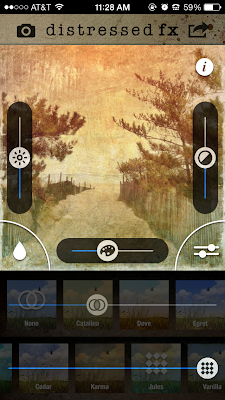
F. Open the saved ImageBlender file in distressed fx and use filters to adjust color save.
Screen shot distressed fx interface
G. Lastly to the saved distressed fx file add a vignette in Mextures and save. This is close but not exact in tone and shading however, I hope the tutorial will give you some ideas for future processing of your images.
Check out my next all day iPhone Sessions in DC on November 24 sponsored by Capital Photography Center (click here for more info) and in Chestertown, Md on November 23 sponsored by The Chestertown River Arts (click here for more info on Chestertown.)
Final image


Wednesday, July 17, 2013

Summer at the beach!! Hipstamatic~ Glaze~Snapseed~Mextures


Every once in a while, in the summer, I am able to get to the beach in between renters.
I left the "Big Camera" at home this time. I only have a few days here and yesterday I did not feel well, but by evening I was wanting to get out to the beach and walk a little as the heat of the day subsided into the 80's!!
So along came the iPhone. It is really hard for a photographer NOT to take pictures! Almost feels like an addiction when I want to give myself a break....
The beauty of an early evening walk is empty chairs, less crowded beach and low angled light casting shadows. The opening image was a test of Hipstamatic...I pointed the iPhone right into the sun looking west. I loved the scene, and wanted to see what I could do with it in post. So I took the original unprocessed image below...and went to work...starting with Snapseed, I applied the ambience filter to the max, brightness adjust, saturation adjust, contrast adjust and then also sharpened and added some structure. I pushed the image more than I would if I was working with a "straight" image file as pushing creates pixel issues, but when I know I am going to "Glaze" it, then it really does not matter....pretty fun stuff!
After running the image through Glaze, I went back into Snapseed and made selective adjustments to the chairs, brightening them as I saw them on the beach, illuminated by the sun!


Call me the beach walker, stalker...looking for a great subject! This couple walked the beach for a good stretch looking for beach treasures, bending over picking shells and then walked holding hands! I loved their presence. So I kinda, walked behind them...making a few images along the way.


Surf fishing is a "thing" here in Delaware, folks pull their trucks on the beach in certain licensed areas.
They make great subjects when they actually have their lines in hand...the long shadows on the gentle surf were a great bonus.


Not all beach umbrellas are equal! This one had the colors of summer in it! It was alone on the beach, its owner probably gone for dinner....


Then there was a beautiful black lab, endlessly jumping into the sea for that green tennis ball!
So that's Summer by the sea!!
Hipstamatic just launched a new Pak...Brighton HipstaPak...if you are a Hipsta fan...time to go shopping! Click on the shopping cart in the app and download it. I look forward to trying it out at the beach as I love the tones in the pak examples. Check out the Hipsta Blog here!
My next iPhone workshop is August 10 in Washington, DC at the historic Union Station...sponsored by Capital Photography Center..click here for more info and registration.

......and iPhone images make great prints! I would be happy to sell one if you are interested please shoot me an e-mail! or leave a message on the Blog comments.

Monday, July 8, 2013

Summer Bouquets ~ Hipstamatic ~ Snapseed ~ Mextures ~ Glaze


Summer is in full bloom in my neck of the woods with the Hydrangeas, Daises, and Day lilies brightening the landscape! The garden has really been beautiful as a result of early and frequent spring rains. So now I am on to making images with flowers. I started a week ago at the beach with some beautiful hydrangeas, and now at home with a broader assortment. I picked a couple vases worth of flowers and decided I wanted to create iPhone images of them.
The opening image started the idea. I had picked a few daisies, Hosta and Loosestrife in the morning from my garden to adorn the kitchen window sill and selected a simple vase. I enjoyed looking at them every time I went to the kitchen sink and then I said, I wonder what I could do with them and the iPhone. I decided to take them into my living room where the walls are painted a deep Wedgwood blue (backgrounds matter) and sit them on top of my tall Polk vintage speakers by the window (light matters).
After arranging the flowers, (composition matters) I made two shots and was satisfied with the images from Hipstamatic using the  Jane Lens and Inas 1969 film with no flash, just window light. Then the processing began...into Snapseed for a little saturation, ambiance, white balance adjustment, sharpening and structure. I knew I was heading toward getting a few images out of Glaze so I really pump up the image before running it into Glaze. I make several iterations in Glaze and use the custom feature to come up with some interesting looks to begin blending and masking in ImageBlender..then maybe back into Snapseed for some more color adjustments, selective adjustments, and sharpening. Then I will add a texture from Mextures and run another Glaze file and blend again...so what you see here is many blends and many different files to get the look that suits me. I posted this on FB and many of my friends liked it. I was encouraged to create another image. So back out to the garden....with another vase, clipping a few more blooms Astilbe, Goldenrod, Hydrangea, Lavender and Geraniums. Once again staging the vase in the same place in my living room I captured another file to work with. Now I wish I had more blooms to work with...but as the garden progresses I will continue to work on using this place in the house for a stage to capture a few more bouquet images. If you live in the area I will be conducting an all day iPhone workshop in Chesapeake City, Md on July 13...have a few more spots open if you would like to join me click here for my iPhone Workshop.
Original Capture

Processed file


Sunday, June 30, 2013

Finding a creative place...inspiration...light and subject


Captured Hipstamatic: Jane Lens Blanko Film No Flash: Processed Snapseed. Glaze, ImageBlender Soft Light
When I find myself at the beach, I find more time for creativity and time to explore processes and subjects on my iPhone. When I view other photographer's images I get ideas...that I can interpret in my own way. The hydrangea images were inspired by a fellow photographer Sue. She posted on her FaceBook page a beautiful shot of her hydrangeas in a ball jar that was simple and finely processed. So.... while I was at the beach with a little time on my hands...I gathered a few hydrangeas and put them in a blue vase and began to play...but it was late in the evening and I had no natural light. I was trying to get something out of the Hipstamatic flash even trying to diffuse the light but didn't come up with anything I found acceptable. However the next morning the hydrangea vase was on the breakfast table and as I looked out to the back porch in the soft shade I thought, perfect light! So I took the hydrangea vase out on the table and made a few shots. Then began to process one or two until I came upon an image I liked. What could be more classic in art than flowers in a vase? All the painters had their version~ VanGogh~Sunflowers Renoir~Garden Flowers ~ Cezanne ~ Chagall they all did a vase of flowers....a classic subject. By no means am I saying these images are worthy of that fine group of painters! but I was very happy with the results! Give it a try!
Captured:Hipsamatic Jane Lens and Blanko Film, No flash Processed: Snapseed: Glaze: Mextures: ImageBlender Golden Evening Light
Later that evening the light was bright on the back porch but not direct, it was the golden hour, so I took the vase out once again and made another slightly different composition. The golden light made the frosted glass table glow golden, and I enhanced the glow with a filter from Mextures.
Captured: Hipstamatic Jane Lens and Blanko Film no flash Processed: Snapseed: Tangled FX; Glaze: IimageBlender
While I was making the composition of the hydrangeas in the vase, I noticed how lovely the petals looked in the evening light and composed a shot looking down on the flower heads. Then experimented with different processes to bring out the beauty in the petals.