Showing posts with label Leonardo. Show all posts

Wednesday, March 2, 2016

The Conservatory ~ Apps: Glaze ~ Camera + ~ Leonardo ~ Snapseed ~ BracketMode ~ Pro HDR x ~ Impression


Captured with BracketMode: Blended using Pro HDR x: Processed in Snapseed: Artistic filter rendered in Glaze: enhanced using Leonardo and signed using Impression
Sharing new ways to capture images on the iPhone with students is so much fun! I just love to see their faces when they blend their first HDR image, they capture using BracketMode and blend using Pro HDR x. It's always an "Oh Wow! Today I had a group of students in a local conservatory and we worked mainly on capturing macro images with our iPhones, but I also had a student who wanted to expand her knowledge on shooting and capturing bracketed HDR images. The images here are an assortment from today's workshop.
Join me in Washington, DC for my next "Getting Started in iPhone Photography" at the National Portrait Gallery, March 13, just a few spots open.
Orchid: Captured using the Macro feature in Camera+: Processed in Snapseed: Artistic filter applied using Glaze: Enhanced using Leonardo: signed using Impression
Captured with BracketMode: Blended using Pro HDR x: Processed in Snapseed: Artistic filter rendered in Glaze: enhanced using Leonardo and signed using Impression

Cactus Flower: Captured using the Macro feature in Camera+: Processed in Snapseed: Artistic filter applied using Glaze: Enhanced using Leonardo: signed using Impression


Thursday, October 30, 2014

Processing Steps: St. Johns Anglican Church ~ Hipstamatic ~ Snapseed ~ Glaze~ ImageBlender ~ Leonardo


St John's Anglican Church, Peggy's Cove, Nova Scotia is a much photographed subject! It's charming red roof and architecture is just fabulous...but there are some composition issues with distracting subject matter, like telephone wires and poles, houses etc..that make it tough for "straight" shots so I decided to shoot it with my iPhone from a slightly different perspective.
I used Hipstamatic to capture the original image below, crouching low to put the fall vegetation in the foreground as a good base to the image and to minimize the roof tops of the background structures.
Join me for my "Getting Started" iPhone Photography workshop sponsored by Capital Photography Center on November 9 at the National Portrait Gallery.
Or catch up with me at during one of my presentations at Nature Visions Photography Expo Nov 15-16.
Here's the process that I used to create the opening image:
Image 1. Original file captured with Hipstamatic Inas 1969 film and Jane lens combo
Image 2. Original file processed with Snapseed using the HDR Scape filter to pop the tones.
Image 3. Iteration 1 created in Glaze using the Workshop Mode and saved
Image 4. Iteration 2 created in Glaze using the Workshop Mode and saved.
Image 5. Iteration 2 blended in ImageBlender with image 2. the HDR version of original image and saved.
Image 6. Image 3 and 4 blended together in ImageBlender and saved.
Image 7. Image 6 blended with image 5 with selective masking applied.
Image 8. Image 7 blended with image 5 to mask in details in the church saved and then run through Leonardo, applying the clarity filter to taste.

Wednesday, April 16, 2014

Whats your Muse? Apps~Hipstamatic ~ Glaze ~ BracketMode ~HDR Pro~ Leonardo ~ Snapseed

Often, I ponder what it is that moves me to see and then create an image......waxing introspectively....
On my recent workshop at The National Gallery of Art, men inspired me, doing what they do in this beautiful environment...as I was working with the group explaining BracketMode and HDR Pro I spotted this gentleman with his camera. I was curious about this older man walking around the gallery putting his camera to his eye and shooting images...at any age photography is a gift and a camera a good companion! I quickly grabbed a BracketMode shot while he stood still looking at the tree with his camera to his face. BracketMode allowed  me to capture the light inside with detail on the wall, as well as the beautiful light falling on the outside building wall. I wondered what image he made....
Captured: BracketMode Processed:HDRPro, Snapseed
After the workshop was over I found him in another section of the gallery and made this image. Waiting until I found just the right composition which allowed me to fit him in between the two paintings hanging on the wall. He was alone with his camera, his thoughts and marvelous art!
Captured: Hipstamatic, Jane lens Inas 1969 film Processed: Glaze, ImageBlender, Leonardo, Impression
The same day one of my young students, who I was terribly impressed with....captured my "Yes" when I saw him holding his iPhone up to capture the condensation of the perpetual condensation display....and once again...the joy of photography came to mind...from the very young with his iPhone to the older gentleman with his DSLR. Amazing....how we see so differently through the lens!!! any lens! and the joy it brings.
Captured: Hipstamatic, Jane Lens Inas 1969 film Processing: None
While showing a workshop student a composition using Hipstamatic, of a man seated, seemingly as part of the stone building structure, an art object himself, we got down low and and made this composition. He never knew we were there.
Captured: Hipstamatic Processed: Glaze, ArtistaSketch, ImageBlender, Snapseed, Leonardo
And after the workshop I strayed into the West wing and captured the Gallery Guard as he was directing traffic and warning people to put their beverage bottles away, again, waiting to catch him in a position separated from the escalator so that he was in a good position to offset his person against the wall in front of him, and waiting for that crossed hand behind the back stance that caught my eye initially.
It is always fun to shoot with the iPhone, then app it up! I have only two spots left for my all day workshop sponsored by Capital Photography Center on May 4th. Hope someone can join me there. For more info Click Here. My next "Getting Started" class is June 1 at the National Portrait Gallery for more info click here.
Captured: Hipsatmatic Jane Lens Inas 1969 film Processed: Glaze, ImageBlender, Snapseed, Leonardo, Impression

Sunday, March 23, 2014

Polamatic~Camera+~Glaze~PhotoArtistaSketch~ImageBlender~Leonardo~Phonto~ Working up a new process

Finished Image My Process Below.....
This image started with a simple grab shot of a little flower arrangement on a table at Chick-fil-a when I was killing some time before a Camera Club meeting I was judging. The process evolved as I was working through a few of my favorite apps and one I recently bought Polamatic. The process steps I took are in order below.
1. Camera+ original capture
2. Saturated in Leonardo
3. Image 2 opened in Polamatic and Filtered in Polamatic
4. Image 3 opened in Glaze and masked using the in app purchase mask feature.
5. Image 3 Glazed. Notice the cool effect of paint drips over the masked out border
using the workshop mode in Glaze to achieve a custom Glaze effect..

6. Image 5 opened in PhotoArtista Sketch with sketch effect reduced to
zero so that the paper texture is totally visible, almost completely obscuring the image file.
7. Image 5 and image 6 Blended and selectively masked in
ImageBlender for an aged paper look.

8. Image 7 adjusted for sharpness, saturation and brightness in Leonardo, then opened in Phonto to add the text.
Join me May 4th in Washington, DC for  my full day of Working with Apps in Depth class sponsored by Capital Photography Center where we will process images with cool apps like the ones used here! For more information and registration click here.

Wednesday, March 5, 2014

New Painterly App ~ Brushstroke

Capture: Camera+ Processed: Brushstrokes, Leonardo, ImageBlender

From the developers of "ToonCamera" comes Brushstroke! I like it! It has the ability to deliver a high resolution file with a nice group of filter options and editing options, with texture, as well as an option to actually add your personalized signature, not script, your hand written signature. Fun! The app filters are varied and the signature option is easy to use. For $2.99 I think it is definitely worth adding to your App portfolio. It will also be a great app to use for blending back with other files using ImageBlender.
Capture: Camera+ Processed: Mextures, Brushstroke, Leonardo
A few notes of info that I wanted to share about some of my favorite Apps, ImageBlender updated today and if you have been loving it for its past ability to uprez files while blending, using the background image as the largest file, check out the new settings as the default came in using the foreground image to scale the blended image. If you want to revert to the prior workflow then you will need to change it in the settings in the ImageBlender App.

Accidental discovery Ha...maybe I am very late to discover this one!!! But I accidentally figured out how to resize the borders within the Snapseed App. Having been a long time user, of Snapseed and loving their borders, when the App updated after Google purchased Nik, it seemed as though the adjust border option went away or did not function, but this week I was "pinching the screen" when the border filter was open and guess what, it changed the size of the border...so... as with many cool features in apps sometimes the features are not so obvious! Just thought I would share...silly me! Now I will be enjoying using their borders again! My next "Getting Started" in iPhone Photography is this Saturday March 8 at the National Building Museum. For more information and registration click here!
Capture: Camera+ Processed: Brushstrokes, Leonardo

Monday, February 17, 2014

A Little Whimsey ~ BracketMode ~ ProHDR ~ Portrait Painter ~ Snapseed~ ImageBlender ~Leonardo

Before the recent snowfalls I wandered around Druid Hill Park one day with my iPhone. It is a fabulous old park in Baltimore with good walking paths, Victorian pavilion structures and magnificent old trees. I made a couple compositions before landing on this one. I just loved how the old trees seemed to embrace the little pavilion in the woods. Below is a series of images with notes on how I arrived at this process. On a humorous note, I was also dubbed a "Master App Stacker", by Gilles Dezeustre of the 11er's by Glaze when he re-tweeted the previous post I made using one of his superb apps Glaze! That gave me a chuckle!! I have been called many things in my lifetime but that's a new title! I guess this post is a good example of App Stacking!! Thanks Gilles! A link to his app can be found here! Glaze... 
Happy to say my Spring 2014 iPhone Photography Class starts tonight at Johns Hopkins and the class is full with a wait list! amazing!! If you are interested in learning more about iPhone photography....Check out the sidebar of this blog for more info on my upcoming iPhone Workshops and classes.
I am also honored to have been invited to Present a Session on iPhone Photography at Nature Visions, in Virgnia this fall. Also happy to have sold a framed iPhone print and a few more ceramic iPhone image magnets at More Than Fine Framing in Baltimore.
Finished processed image copyright added with Impression
BracketMode Image no 1 Captured for highlights

BracketMode Image no 2 Captured for dark areas

Processed image no 3 BracketMode images 1 and 2 in ProHDR
Snapseed image no 4 sharpened and converted to monochrome
Snapseed image no 5 Retrolux Filter
ImageBlender image no 6 : Image no 3 and image no 5 combined
Image no 7 processed image no 6 in Portrait Painter by JixiPix
and enhanced color and saturation in Leonardo

Monday, November 11, 2013

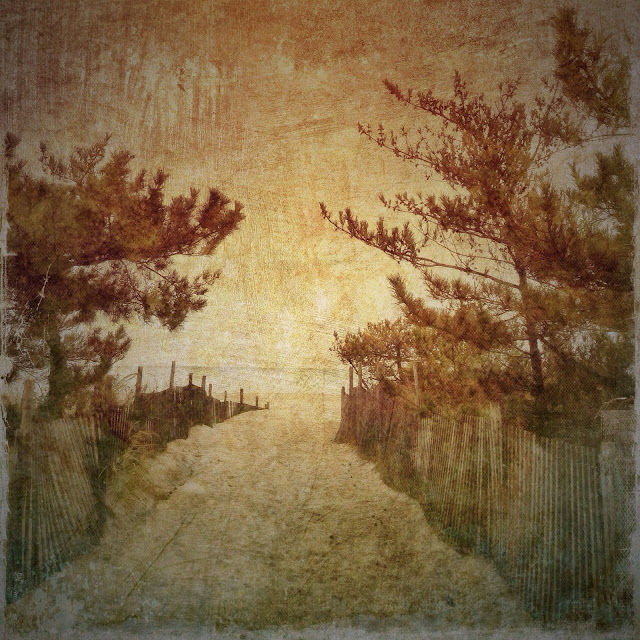
Beach Pines~ You can never duplicate the exact image unless you write it all down!


This is an image I posted on Facebook over the weekend. One Facebook friend said they hoped I would write a tutorial on my blog for this processing. Well...... I can tell you what I shot it with and maybe a few steps along the way. However to duplicate the exact same image after the fact, with a process one could share, without writing down the original process, is almost impossible. I am not one to write down my processes with exacting steps. In this tutorial I have tried to recreate the image to some degree here. Hopefully these steps will be a starting point for a creative process you might want to try.

Original Image Capture: Hipstamatic Oggl ~ Lowry Lens Kodot XGrizzled Film
The reason I chose Oggl is because you can control exposure. Using the reticles in Oggl I wanted to open up the deep shady areas of the pines. I didn't care if the sky blew out because it was gray and overcast anyway. I did want a hint of horizon line from the ocean. SO controlling capture is important to me as well as processing. I knew I wanted to add textures to the sky area when I shot this image.
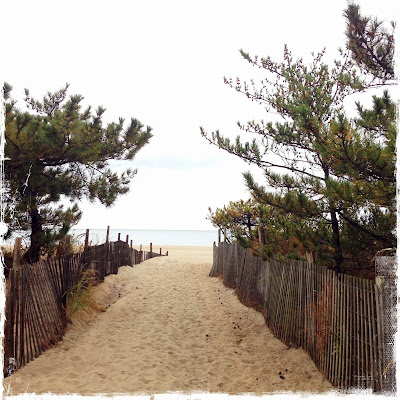
Original Capture
Processing:
A. Open the Hipstamatic image in Mextures then choose
 1. Grunge Filter Painterly
                                           Choose Blend Mode Multiply
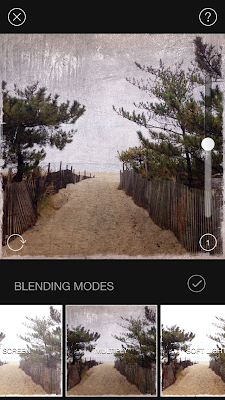
Screen shot of Mextures Grunge interface
Then Adjust texture to 50% Check and continue to add filters in Mextures.
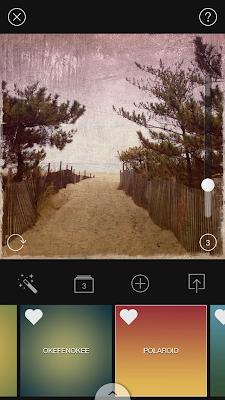
Screen shot of Mextures Vintage User interface
   2. Then add new filter in Mextures
       Landscape enhance "Vignette" at 20 %  Blend mode overlay (not shown) Check and continue  to  add filter in Mextures.
   3. Then add new filter in Mextures
          Vintage "Polaroid" at 20% Blend mode Hard Light 
Save file to Photo Library

B. Open the saved Mextures file in AutoPainter and apply Benson filter and save.
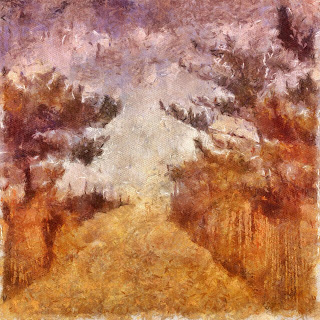
AutoPainter file

C. Open the last saved Mextures file (not the AutoPainter file) in Leonardo and apply the Clarity slider as shown in screenshot and save to Photo Library.
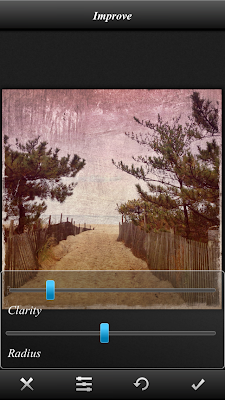
Screen shot Leonard Clarity interface
D. Open AutoPainter saved image in Snapseed and add ambience and warmth in the Tune Image Command and save file.
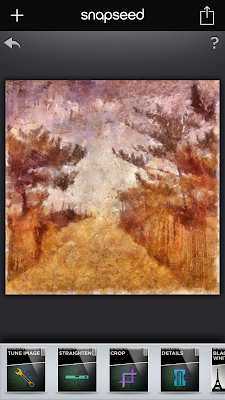
Screen shot Snapseed
E. Open Image Blender and open The last saved Mextures file from Leonardo first, with the last saved AutoPainter file from Snapseed and blend with Lighten mode at about 45% and save.
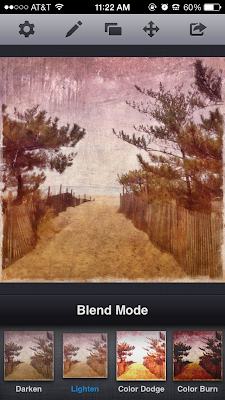
Screen shot ImageBlender interface
F. Open the saved ImageBlender file in distressed fx and use filters to adjust color save.
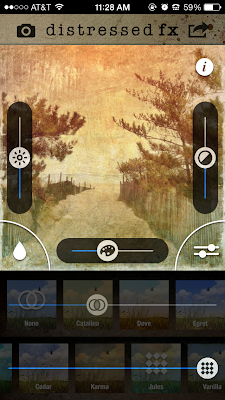
Screen shot distressed fx interface
G. Lastly to the saved distressed fx file add a vignette in Mextures and save. This is close but not exact in tone and shading however, I hope the tutorial will give you some ideas for future processing of your images.
Check out my next all day iPhone Sessions in DC on November 24 sponsored by Capital Photography Center (click here for more info) and in Chestertown, Md on November 23 sponsored by The Chestertown River Arts (click here for more info on Chestertown.)
Final image


Sunday, November 3, 2013

Trees: Hipstamatic Classic: Glaze: Leonardo: ImageBlender


It has been a beautiful fall week with the trees really showing their colors. I have been gathering a collection of colorful tree images from my iPhone. While working with Glaze in workshop mode I have developed a filter that I like for trees...it reminds me of a style of painting called Pointillism made popular by Georges Seurat...and yes it is a form of Impressionism which I love so much!
I also updated to iOs7 and I definitely see a purple tint in some images. The update went well after sorting off 2000 images from my iPhone and backing up the computer...updating all the apps that needed updating, then updating to iOs7. If you are one of the 30% that have not yet updated, click here for some tips before updating.
After updating, I had to change the home screen background and found that using a burgundy background allowed me to readily see the names of my app folders, which I found hard to do with the new design of the app folders. Then I immediately followed tips on saving battery power that were published...click here for a good list. Then I started to find the new features...Click here for a list of what you can now do with the updates.
Now heres a few more trees! I love fall! I hope you have been enjoying it where ever you are!
My  next "Getting Started" in iPhone photography workshop sponsored by Capital Photography Center is November 17 in Baltimore, click here for more information.
Also I will be doing an all day iPhone photography workshop "Working with Apps in Depth" in Washington, DC on November 24. Click here for more info and registration.
And.....I will be in Chestertown, Maryland on Saturday November 23 at the Chestertown River Arts for an all day iPhone photography workshop "Working With Apps in Depth"..click here for more info and registration.