Showing posts with label Photo fx. Show all posts

Monday, August 24, 2015

Shooting the Sunrise: Apps: Camera+ ~ Photo Fx ~ Snapseed

Final Processed Image
I love standing at the edge of the ocean before sunrise and on my last day at the beach this August I did just that before packing up and heading out. It was a short week and I did not even take my big camera, but as the sun began to rise I could not help but capture a few images with my iPhone, it was a beautiful morning. Today I had a few minutes to share my steps on the capture and processing the image I made that morning.

Capture: I am an avid Camera+ user when I want a clean file to work with, one that is closest to the kind of file I might get from shooting with my DSLR. (No pre-applied filters just a straight shot.) The really big advantage for me using Camera+ is the ability to choose and lock focus and choose and lock exposure. I chose the exposure I wanted by moving the exposure reticle around the screen until I saw the exposure I liked then locked it while I locked my focus as well, then all you have to do is keep firing the shutter button. I made the exposure to capture detail in the sea, knowing the area just above the horizon would blow out and I could YES, Fix it in Post!
Image 1: Original Capture
Image 2: Original with Levels (in PS) showing blow out in highlights just to demonstrate  my thoughts and for purposes of  confirming my capture. (Note: Non of the processing of this image was done in PS)

Processing: Photo FX by Tiffen is one of my favorite landscape processing apps because of the Grad Filters.
Image 3: Access the main "Grad Menu" by tapping on the Grads/Tints icon,
 then tap on the bottom right image to open the Strip Grad menu.
Image 4: Once in the strip grad menu there are sub menus of colors.
I used the Chocolate strip grad by tapping on the icon image identified as chocolate.
Image 5: When you tap on the chocolate strip grad icon this screen appears.  As you can see the filter has been applied over the entire image. But I only wanted the effect on the bright area just above the horizon. By tapping on the dashed circle icon at the bottom of the menu screen a new option appears on the screen.
Image 6: By dragging the shaded gray circles on the screen at the top and bottom
of the image you can reposition the strip grad filter.
Image 7: Grad strip filter adjusted to area desired.
Image 8: In addition to adjusting the placement of the grad strip you can also adjust the color and opacity of the grad by tapping on the blue adjustment icons to the immediate left of the dashed circle icon. When you tap on that it brings up a color picker. By moving the circles around on the two color graphs you can choose the color you want.
Image 9: When its time to save your adjustments you can tap on the lower right save icon in image 8 and either add these adjustments as a layer and proceed with further adjustments by choosing add layer or you can save to camera roll. I save the adjusted image to my camera roll for further processing in Snapseed.
Image 10: Further processing in Snapseed, using Tonal Contrast: Ambience, Saturation, Warmth, Details and Structure. 
Image 11: Final Processed image

Image 12: Histogram in PS of final image showing detail and color now in the bright areas above the horizon.

Monday, February 20, 2012

Sometimes Simple is best~Apps: BracketMode~Sanpseed~ProHDR~TouchRetouch~Photo fx

I posted this iPhone, shot and processed, image to a few social sites including InstaGram, GooglePlus and FaceBook. I received many positive comments from viewers. So much that it made me think about why; What is it about a simple shot of the sun rising through the mist over a body of water? Was it something universal in our human experience that we so loved and related to?
The mystery of fog, the renewal of a new day, the calming effect of water, the suggestion of land, the soft colors of blue and yellow....a combination of elements that must be universally appealing and appreciated.
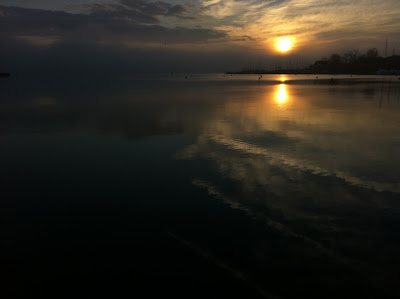
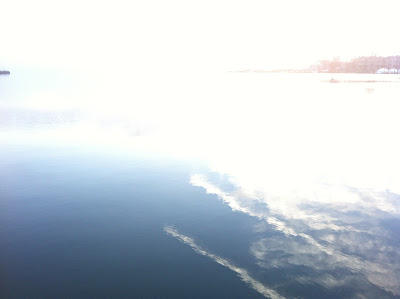
It also made me want to share the process for this simple yet emotion invoking image. Honestly, it was a hand held grab shot...pointed the iPhone lens toward the sun, made a composition and then made two exposures using the shooting app BracketMode: it is amazing how well this app works for capturing the dynamic range of light in a scene.
BracketMode Exposure 1 for the darks

BracketMode Exposure 2 for the highlights
I then blended these two shots in ProHDR: (making adjustments in the app to achieve this image)
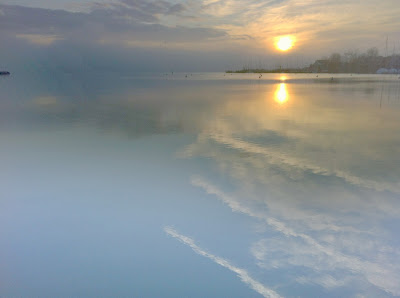
ProHDR processed image
I wanted to make some further image adjustments so I brought the image into SnapSeed and made adjusts to saturation white balance, sharpness and added an off center blur effect.
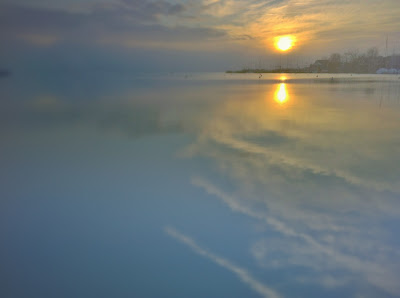
Snapseed Adjusted image
I didn't like the contrail reflections that appeared in the water and the dark speck of land in the upper left so I used an app called TouchRetouch to make a selection and get rid of the undesirable elements. Touch Retouch is another amazing app, and functions much like content aware in PhotoShop when using the Lasso tool.
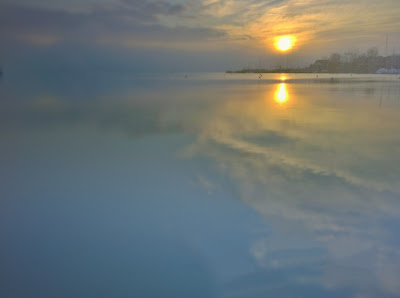
TouchRetouch adjusted image removed contrail reflections
I was happy with the tone of the image at this point and removing the contrail reflections helped but I wanted more fog, the image to me was still too harsh. I opened the app Photo fx on the iPhone and applied a fog filter adjusting the opacity to my taste. I also made further adjustments to the color tone in the image to achieve the final image. As a photographer I am still amazed with the shooting and processing possibilities of the iPhone and Apps!
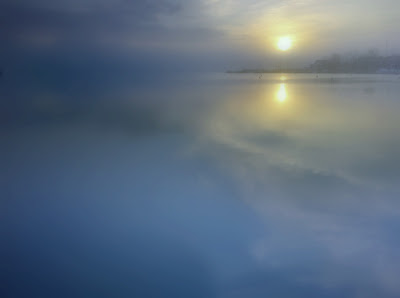
Final image adjusted in Photo fx for tone and fog.
I will be conducting a day long advanced iPhone workshop on March 16 in Gaithersburg, Maryland and will be demonstrating apps and techniques I use to shoot and process images. If you would like to attend click here for registration and more info.